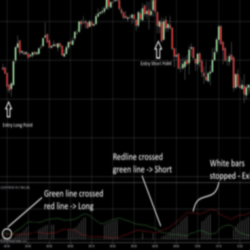
DTB River is an implementation of DTB Waves on non-time based charts and the results are plotted on time-based charts. It provides an added layer of noise filtering for waves. During the consolidation phase DTB River flattens out.
By subscribing to our Indicator Spotlight traders get a free monthly download from the LizardIndicators indicator library. All indicator features are documented with an explanation on how the indicator can be used in a trading strategy. Sign up today!
Try this FREE Voss Predictive Filter by John Ehlers & Henning U. Voss, with source code included by PVoodoo.com. Test it today for free!
Track and visualize your risk/reward level based on your live stop position. Get real-time information with boxes displaying key details about your active orders, ensuring you make informed trading decisions. Access full info about your live trade, allowing you to manage your position effectively.
DTB Ultimate Bands is a next-generation of price envelopes that does all the heavy-lifting for traders. Once applied on a price chart, it pinpoints Overbought and Oversold areas with unmatched accuracy. Get a free trial!
B4 CoPilot simplifies trend direction with a visual representation in chart background colors, shows optimal trade entry points with arrows and price regions. It also has several models that execute semi-autonomous order flow entry, using our institutional grade day trading engine.
Volume has gravity, and the market has a memory. See each bar's volume profile simply and clearly with the TC_BarProfiler. Look inside the bar to see where the action happened, and detect the important price levels. Free to download for NinjaTrader 7 & NinjaTrader 8!
Liquidity is one of the most important signals that traders can pay attention to in the market. It shows how market participants are feeding the price levels. It is not only for limit orders but also related to the speed that traders and institutions can respond to new price actions.
This NinjaTrader indicator is programmed to highlight the big money trades. The numbers are placed under each bar which makes it easy to see where the action/noise is taking place.
This indicator allows the user to copy-paste in one button, increasing application functionality and user charting efficiency.